10 Best Digital Products to Sell on Etsy for Beginners
Published: 22 Oct 2026
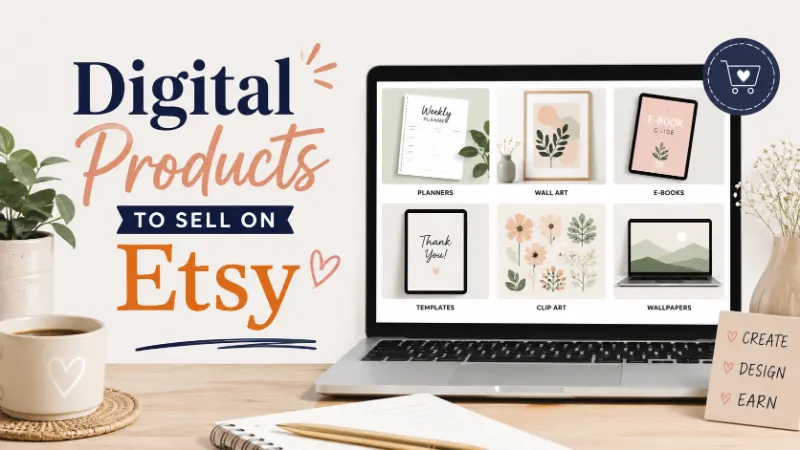
Selling digital products on Etsy can help you start a small online business without storing physical items or shipping orders. You can create a product once and sell the same file to many customers.
But which products should you create first? This guide covers 10 digital product ideas, what to include in each product, and how to choose an idea that fits your skills and customer demand.
Some of the best digital products to sell on Etsy include printable planners, Canva templates, budget spreadsheets, meal planners, digital art, fonts, branding kits, coloring pages, social media templates, and educational worksheets.
These products can suit beginners, but sales are not guaranteed. Your results depend on product quality, customer demand, competition, pricing, and how well you present your listings.
What Are the Best Digital Products to Sell on Etsy?
Digital products are files that customers download instead of receiving a physical item. These can include PDFs, editable templates, spreadsheets, artwork, and other digital files. Etsy sellers can use this model to offer useful products without managing physical inventory.
Before choosing an idea, think about what people already search for on Pinterest and Etsy. A product that solves a clear problem often gives you a stronger starting point than a design made only because it looks attractive.
1. Printable Organizers and Productivity Planners
Printable planners help people organize their days, manage tasks, and track personal goals. They work well as Etsy digital downloads because customers can print them at home or use compatible digital note-taking apps.
- Daily and weekly planners
- Goal-setting and habit trackers
- Monthly calendars and task lists
Daily, Weekly, and Monthly Planning Pages
These pages help customers plan their time and keep important tasks in one place.
- Daily schedules
- Weekly task lists
- Monthly overview pages
- Goal-tracking sheets
Budget and Life Organization Planners
These planners help customers manage everyday responsibilities, from household spending to personal routines.
- Bill payment trackers
- Cleaning schedules
- Savings goal sheets
- Personal routine trackers
Example: A beginner designer could create a 20-page planner for busy students. The bundle could include a weekly schedule, assignment tracker, exam calendar, and habit tracker.
Readers who want to manage their own spending can also explore how to save money on rent.
2. Editable Canva Designs for Small Businesses
Small business owners often need professional designs without hiring a designer for every task. You can create Canva templates that customers customize with their own text, colors, photos, and brand details.
- Pinterest pin templates
- Instagram post layouts
- Business flyers and invitations
Pinterest and Social Media Design Packs
These packs help creators publish attractive content without designing every post from scratch.
- Pinterest pin layouts
- Instagram carousel designs
- Story and post templates
- Quote graphic collections
Marketing Materials for Small Businesses
Local businesses and freelancers need simple materials to promote their services and products.
- Price lists and service menus
- Promotional flyers
- Media kits
- Lead magnet covers
Example: A designer could create 30 Pinterest pin layouts for food bloggers. The customer could replace the sample text and images with their own content.
Make your template instructions clear. Explain what buyers receive, whether they need a Canva account, and which design elements they can edit. Use your own designs and assets that you have permission to sell.
3. Spreadsheet Templates for Personal Finance
Many people want a simple way to track their money without building a spreadsheet from scratch. A well-organized budget spreadsheet can help them record income, expenses, savings, and monthly bills.
- Monthly budget spreadsheets
- Debt payment trackers
- Savings and expense calculators
Personal Budget and Expense Sheets
These spreadsheets help customers understand where their money goes each month.
- Income and expense logs
- Monthly budget dashboards
- Bill tracking sheets
- Spending category summaries
Savings and Debt Tracking Tools
These products give customers a clear way to follow their financial goals.
- Emergency fund trackers
- Debt repayment logs
- Savings challenge sheets
- Annual savings summaries
Example: You could build a monthly budget spreadsheet with separate tabs for income, expenses, savings, and bills. Add clear labels and a short guide for first-time spreadsheet users.
Test all formulas before selling. A broken total or incorrect calculation can frustrate customers and lead to complaints. Also explain whether the file works in Excel, Google Sheets, or both.
4. Meal Planning and Grocery Organization Kits
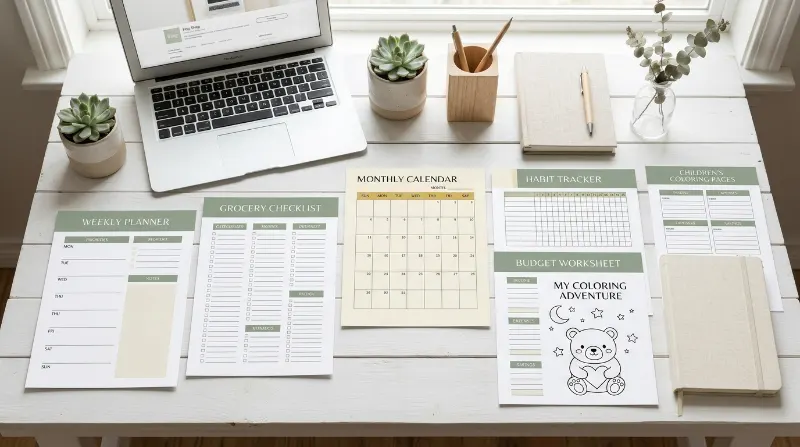
Meal planning products help families, students, and busy professionals plan meals before shopping. These printable templates can save planning time and help customers organize grocery lists around their weekly meals.
- Weekly meal planners
- Grocery shopping lists
- Pantry inventory sheets
Weekly Meal Planning Pages
Customers can use these pages to plan meals and keep their shopping needs in one place.
- Breakfast, lunch, and dinner grids
- Weekly meal calendars
- Recipe planning sheets
- Leftover tracking pages
Grocery Lists and Kitchen Trackers
These tools help customers organize food shopping and reduce forgotten items.
- Categorized grocery lists
- Pantry inventory checklists
- Freezer inventory sheets
- Food expiry tracking pages
Example: A seller could offer a family meal-planning bundle with a weekly menu, grocery list, pantry checklist, and recipe card. The design should be easy to print and read.
You can also make specialized products for vegetarian meals, student kitchens, or small households. Avoid making health claims or presenting a general meal planner as a medical diet plan.
Readers who want to improve their personal finances may also find these money-saving tips for students useful.
5. Digital Art, Wall Prints, and Illustrations
Digital artwork lets customers decorate rooms or create personal projects without waiting for a physical print to arrive. You can sell original illustrations and downloadable wall art in several useful sizes.
- Printable wall art
- Nursery and children’s room prints
- Decorative quote artwork
Minimalist and Home Decor Prints
Simple artwork can suit customers who want coordinated decorations for their homes or offices.
- Abstract line art
- Botanical illustrations
- Neutral wall art sets
- Seasonal decorations
Personalized and Themed Artwork
Focused collections help customers find art that matches a specific room, interest, or occasion.
- Name and initial prints
- Nursery animal illustrations
- Kitchen wall art
- Holiday artwork
Example: A designer could create a set of three matching botanical prints. The listing could explain the available file sizes and how customers can print the artwork.
Use original artwork or assets you have the right to sell. Avoid copyrighted characters, brand logos, and designs that use someone else’s work without permission.
6. Fonts and Lettering Resources
Fonts can serve bloggers, designers, small business owners, and people who create invitations or digital products. This idea requires more design knowledge, but it can appeal to customers who need a distinct style for their projects.
- Handwritten font families
- Decorative display fonts
- Lettering and alphabet sets
Font Families for Creative Projects
Customers may want different font styles for headings, invitations, packaging, or branding.
- Script fonts
- Sans-serif font families
- Serif display fonts
- Hand-drawn lettering
Font Bundles and Lettering Sets
A useful bundle should include clear files and simple installation instructions.
- Multiple font weights
- Uppercase and lowercase letters
- Numbers and punctuation
- Installation guide
Example: You could sell an original handwritten font with a matching alphabet sheet and a short guide explaining how to install it.
Check the font license carefully before listing it. Buyers need to know whether they can use the font for personal projects, commercial designs, or both. Do not resell fonts you do not own or have permission to distribute.
7. Branding Kits for Bloggers and Small Businesses
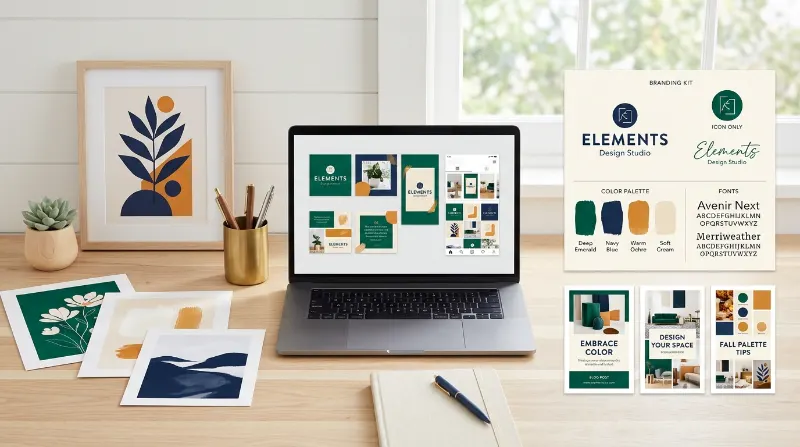
New businesses need a consistent look across their websites, social accounts, and marketing materials. A branding kit can provide matching design elements without requiring customers to hire a designer for every asset.
- Logo variations
- Brand color palettes
- Font pairing guides
Starter Branding Kits
These kits help new business owners create a consistent visual identity.
- Primary logo and alternate logo
- Brand color codes
- Heading and body font suggestions
- Simple brand style sheet
Brand Assets for Online Creators
Bloggers and online sellers often need designs for several platforms. Matching assets can help their content look consistent.
- Social profile graphics
- Pinterest board covers
- Blog graphics
- Business card layouts
Example: A seller could create a branding kit for a fictional handmade soap business. It might include an original logo, a color palette, font suggestions, and matching social graphics.
State exactly what the buyer receives. A template-based branding kit is different from a custom design service, so explain whether customers can edit the files themselves.
If you’re building a blog business, read this blog income report for an example of how blogging income can be discussed and tracked.
8. Printable Coloring Pages and Activity Sheets
Coloring pages and activity sheets can appeal to parents, teachers, and adults who enjoy creative activities. Focus on a clear audience and create original pages that buyers can download and print when needed.
- Children’s coloring sheets
- Adult coloring collections
- Seasonal activity pages
Coloring Pages for Kids
Parents and teachers may want simple pages for home activities, classrooms, or quiet time.
- Animals and nature
- Shapes and basic objects
- Holiday-themed pictures
- Easy tracing activities
Coloring Sheets for Adults
Adult coloring products can use more detailed patterns and themed illustrations.
- Floral patterns
- Geometric designs
- Nature-inspired scenes
- Relaxing abstract patterns
Example: A seller could create 15 original animal coloring pages for preschool children. The bundle could include a simple cover page and a clear printing guide.
Keep the drawings age-appropriate and easy to print. If you include educational activities, check spelling and instructions before publishing the files.
9. Educational Worksheets and Learning Resources
Parents, tutors, and teachers use worksheets to support learning at home or in the classroom. These products can serve a specific age group or skill, which makes it easier to explain their purpose in a listing.
- Alphabet and number worksheets
- Reading practice pages
- Study planners and revision sheets
Early Learning Printables
These resources help young learners practice basic skills through simple activities.
- Letter tracing pages
- Number recognition sheets
- Matching activities
- Basic shape worksheets
Study and Classroom Resources
Older students and teachers may need printable materials to organize lessons and study time.
- Revision planners
- Vocabulary worksheets
- Reading logs
- Assignment trackers
Example: You could create a beginner alphabet pack with letter tracing, picture matching, and simple coloring activities. State the intended age or skill level in the product description.
Check every answer, instruction, and spelling choice. If you use educational standards or curriculum claims, verify that your resource matches them before mentioning them in your listing.
10. Digital Products for Content Creators
Content creators need a steady supply of graphics and planning tools for their blogs, websites, and social accounts. You can serve this audience with focused products that help them plan, publish, and organize content.
- Blog content calendars
- Social media graphics
- Content planning dashboards
Blog and Pinterest Content Tools
Bloggers need ways to organize post ideas and promote their articles. A useful digital bundle can combine planning pages with ready-to-edit designs.
- Blog post planners
- Pinterest pin layouts
- Keyword research trackers
- Editorial calendars
Creator Business Templates
Freelancers and content creators also need tools to manage routine work and communicate with clients.
- Client onboarding forms
- Content brief templates
- Project tracking sheets
- Simple invoice templates
Example: You could build a content planner for beginner bloggers with a blog calendar, keyword tracker, Pinterest promotion checklist, and post update log.
Keep the product focused on one main task. A small, well-organized bundle can be easier to understand than a large pack filled with unrelated files.
For another practical approach to managing a limited budget, explore the money-saving tricks and $1,000 monthly challenge.
How to Choose the Right Digital Product for Your Etsy Shop
You do not need to create all 10 product types at once. Start with one product that matches your skills, serves a clear customer need, and gives you room to create related products later.
Which Product Should You Create First?
Use these questions to narrow your options before you spend time designing a full collection.
- Enjoy organizing? Try planners or spreadsheets.
- Like graphic design? Try branding kits or Pinterest templates.
- Enjoy teaching or drawing? Try worksheets or coloring pages.
- Have font design skills? Explore original fonts and lettering.
How Can You Check Whether People Want Your Product?
Research helps you understand what customers search for and what other sellers offer. It cannot guarantee sales, but it can help you make a better choice.
- Search your product idea on Etsy.
- Explore related searches on Pinterest.
- Compare competitor prices, formats, and reviews.
- Look for a clear need you can serve differently.
Example: If many listings offer general planners, you could focus on a planner for first-year college students. The narrower audience gives you a clear direction for the design and product description.
How to Sell Digital Products on Etsy
Creating a product is only one part of running an Etsy shop. You also need to prepare your files, write a clear listing, set a sensible price, and help buyers understand what they will receive.
Step 1: Create and Prepare Your Files
Your files should be easy to open, understand, and use. Choose a format that suits the product and explain any software requirements.
- Use PDF for many printable products.
- Use suitable image formats for artwork.
- Test spreadsheet formulas and links.
- Include instructions when buyers need them.
Step 2: Make Your Etsy Listing Clear
A good listing helps customers decide whether your product meets their needs. Use clear wording and preview images that accurately represent the files.
- Write a descriptive product title.
- Explain the included files and sizes.
- Add relevant search terms naturally.
- Show helpful previews of the product.
Step 3: Improve Your Listing Over Time
Etsy SEO means improving your product listing so shoppers can find it through relevant searches. Use accurate keywords and clear product details instead of repeating the same phrase.
- Research phrases buyers may use.
- Use relevant tags and categories.
- Review customer questions and feedback.
- Update unclear descriptions or previews.
Step 4: Price Your Product Carefully
Your price should reflect the product’s usefulness, quality, and the market. Consider your creation time and Etsy’s current selling fees before choosing a price.
- Compare similar products.
- Include marketplace fees in your calculations.
- Avoid pricing based only on competitors.
- Review your price as your product improves.
Etsy’s fees, listing rules, and digital product requirements can change. Check the current official seller policies before opening your shop or publishing a listing.
Frequently Asked Questions
1. What Is the Easiest Digital Product to Sell on Etsy?
Printable planners, checklists, and simple worksheets can be accessible starting points for beginners. Choose a product you can create well and make useful for a specific audience.
2. Can You Sell Canva Templates on Etsy?
You can sell eligible original templates, but you must follow Etsy’s rules and Canva’s current licensing terms. Explain how buyers access and edit the templates, and do not resell Canva’s existing content as your own.
3. Do Digital Products on Etsy Generate Passive Income?
Digital products can support passive income because customers can purchase files without you shipping each order. However, you still need to handle product updates, customer support, marketing, and shop management. Sales are not guaranteed.
4. How Much Does It Cost to Start Selling Digital Products on Etsy?
Your costs depend on the tools you use, Etsy’s current fees, and any other business expenses. You may be able to start with free design software, but check the latest seller fees and account requirements before launching.
5. How Can Beginners Get Traffic to Their Etsy Shop?
Start by improving your product listings and creating useful Pinterest content. Use clear product images, relevant keywords, and pins that match what your target audience wants. You can also test different designs and topics to see which attract interest.
Conclusion
The best digital products to sell on Etsy solve a clear problem for a specific customer. Start with one idea, create a useful product, and improve your listing based on research and feedback.
You can also build related products once you understand your audience and their needs. Which product idea will you test first?
Your next step: Choose one product from this list, research similar listings, and create a small
- Be Respectful
- Stay Relevant
- Stay Positive
- True Feedback
- Encourage Discussion
- Avoid Spamming
- No Fake News
- Don't Copy-Paste
- No Personal Attacks
- Be Respectful
- Stay Relevant
- Stay Positive
- True Feedback
- Encourage Discussion
- Avoid Spamming
- No Fake News
- Don't Copy-Paste
- No Personal Attacks
