TiviMate vs Smarters Pro: Which IPTV Player Is Better for Your Streaming Needs?
Published: 14 Jun 2026
Choosing the right IPTV player can improve your streaming experience. Many IPTV users compare TiviMate and IPTV Smarters Pro before making a decision. Both apps support live TV, movies, and series, but they offer different features and user experiences.
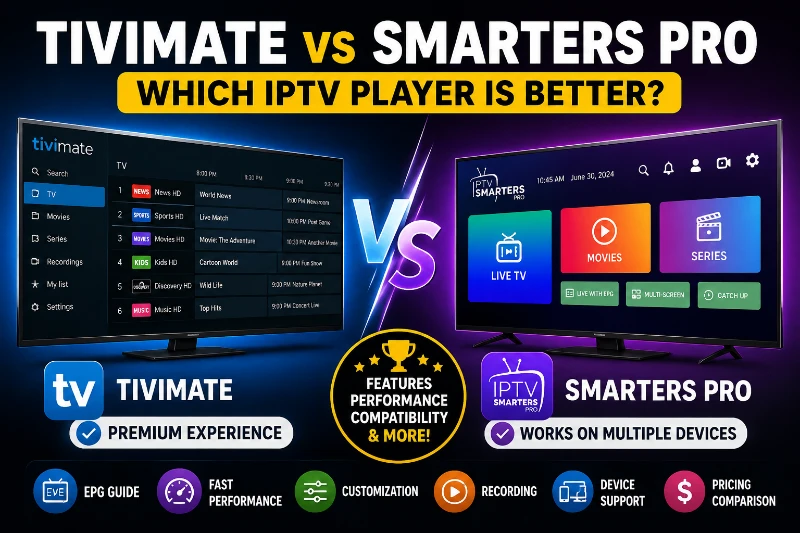
TiviMate is popular among Android TV and Firestick users. It provides a premium interface and advanced customization options. IPTV Smarters Pro focuses on simplicity and wider device support. It works on Android, iPhone, Windows, Mac, and many Smart TVs.
So, which IPTV player should you choose?
In this detailed TiviMate vs Smarters Pro comparison, we will look at features, performance, device compatibility, pricing, ease of use, and customization options. By the end of this guide, you will know which IPTV player fits your needs best.
What Is TiviMate?
TiviMate is one of the most popular IPTV players for Android TV devices. It helps users organize and watch IPTV channels through a clean and modern interface. Many IPTV enthusiasts consider it one of the best IPTV player apps available today.
The app does not provide TV channels or content. Instead, it works with IPTV subscriptions that users already have. Once you add an IPTV playlist, TiviMate displays channels in an easy-to-use TV guide.
Key Features of TiviMate
TiviMate offers many advanced features that improve the viewing experience.
Modern User Interface
The first thing users notice is the design. TiviMate looks similar to a premium cable TV box. The layout feels clean, organized, and professional.
For example, if you have hundreds of IPTV channels, you can quickly browse categories without feeling lost.
Advanced EPG Support
EPG stands for Electronic Program Guide. It shows current and upcoming TV programs.
TiviMate provides one of the best EPG systems in the IPTV market. Users can customize the guide, assign EPG sources, and organize channel information easily.
This feature helps viewers find programs faster without manually searching through channels.
Multiple Playlist Support
Many IPTV users subscribe to more than one service. TiviMate allows users to add multiple playlists in one place.
This feature makes channel management much easier. Users can switch between playlists without changing apps.
Fast Channel Switching
Nobody likes waiting for channels to load.
TiviMate is known for fast channel switching. The app is optimized for Android TV devices and delivers smooth navigation.
Recording Support
Premium users can record live TV programs for later viewing. This feature is useful for people who cannot watch their favorite shows live.
Supported Devices
TiviMate works mainly on Android-based devices, including:
- Android TV
- Fire TV Stick
- Fire TV Cube
- Nvidia Shield
- Android TV Boxes
The app is designed specifically for TV screens and remote controls.
Pros of TiviMate
- Modern and attractive interface
- Excellent EPG management
- Fast performance
- Multiple playlist support
- Powerful customization options
- Great experience on Firestick and Android TV
Cons of TiviMate
- Limited support outside Android devices
- Some advanced features require Premium
- Not available natively on iPhone or Samsung Tizen TVs
Who Should Choose TiviMate?
TiviMate is ideal for users who want a premium IPTV experience. It works best for Android TV and Firestick owners who enjoy customization and advanced features.
If you want your IPTV service to feel like traditional cable television, TiviMate is often the better choice.
What Is IPTV Smarters Pro?
IPTV Smarters Pro is another popular IPTV player that allows users to watch live TV, movies, and series through their IPTV subscription. It is known for its simple setup process and broad device compatibility.
Unlike TiviMate, IPTV Smarters Pro supports many platforms. Users can install it on smartphones, tablets, computers, and Smart TVs. This flexibility makes it a popular choice for families and users who stream on multiple devices.
Like TiviMate, IPTV Smarters Pro does not provide channels or content. Users must add their own IPTV service credentials to access content.
Key Features of IPTV Smarters Pro
IPTV Smarters Pro offers several useful features that make streaming easy for beginners and experienced users alike.
Easy Setup Process
One reason many people choose IPTV Smarters Pro is its simple installation process.
Users can add their IPTV service using:
- M3U Playlist URL
- Xtream Codes API
- Login credentials provided by their IPTV provider
Most users can complete the setup within a few minutes.
Multi-Platform Support
IPTV Smarters Pro works on many devices, including:
- Android phones and tablets
- Android TV
- iPhone and iPad
- Windows PCs
- Mac computers
- Samsung Smart TVs
- LG Smart TVs
This wide compatibility is one of the biggest advantages of IPTV Smarters Pro.
Live TV, Movies, and Series Categories
The app organizes content into separate sections.
Users can easily switch between:
- Live TV channels
- Movies
- TV Series
This structure helps users find content faster.
Multi-Screen Support
IPTV Smarters Pro allows users to watch multiple channels at the same time on supported devices.
This feature is useful for sports fans who want to follow several events simultaneously.
External Player Integration
Users can connect external media players if they prefer different playback options.
This flexibility gives users more control over their viewing experience.
Supported Devices
IPTV Smarters Pro supports more platforms than most IPTV players.
Popular supported devices include:
- Android devices
- Android TV
- Firestick
- iPhone and iPad
- Windows
- Mac
- Samsung Smart TVs
- LG Smart TVs
This makes IPTV Smarters Pro a practical choice for users who own different types of devices.
Pros of IPTV Smarters Pro
- Easy to install and use
- Supports many devices
- Beginner-friendly interface
- Multi-screen viewing support
- Simple content organization
- Works well on mobile devices
Cons of IPTV Smarters Pro
- Limited customization options
- EPG features are less advanced
- The interface feels older compared to TiviMate
- Large playlists may sometimes feel slower
Who Should Choose IPTV Smarters Pro?
IPTV Smarters Pro is a good option for users who want a simple and straightforward IPTV player.
It is especially useful for people who:
- Use multiple devices
- Want quick setup
- Prefer simplicity over advanced customization
- Need support for iPhone or Smart TVs
TiviMate vs Smarters Pro: Quick Comparison Table
Before we dive deeper, let’s compare the most important features side by side.
| Feature | TiviMate | IPTV Smarters Pro |
| Best For | Android TV & Firestick Users | Multi-Device Users |
| User Interface | Premium & Modern | Simple & Clean |
| Ease of Use | Good | Excellent |
| Device Support | Android-Based Devices | Android, iOS, Windows, Mac, Smart TVs |
| EPG Support | Advanced | Basic to Moderate |
| Customization | Excellent | Limited |
| Multiple Playlists | Yes | Yes |
| Recording Features | Advanced | Basic |
| Multi-Screen Viewing | Limited | Available |
| Performance | Excellent | Good |
| Learning Curve | Medium | Easy |
| Premium Features | Required for Full Access | Optional |
User Interface Comparison
The user interface plays an important role in daily streaming. A good interface helps users find channels quickly and enjoy a smooth experience.
TiviMate User Interface
TiviMate offers one of the most attractive IPTV interfaces available today.
The design feels similar to a modern cable television service. Channels, categories, and TV guides are displayed in a clean and organized way.
Users can customize layouts and adjust settings according to their preferences.
The interface is designed specifically for TV screens and remote controls.
Benefits of TiviMate’s Interface
- Professional appearance
- Smooth navigation
- Easy channel browsing
- Better organization for large playlists
- Excellent TV guide visibility
IPTV Smarters Pro User Interface
IPTV Smarters Pro focuses on simplicity.
The design is easy to understand and works well for beginners. New users can learn the app quickly without spending time adjusting settings.
The interface separates Live TV, Movies, and Series into different sections, making navigation simple.
However, compared to TiviMate, the design feels less modern and offers fewer customization options.
Benefits of IPTV Smarters Pro Interface
- Easy to learn
- Beginner-friendly layout
- Simple navigation
- Consistent experience across devices
Which Interface Is Better?
If you want a premium television-like experience, TiviMate is the clear winner.
If you prefer a simple interface that works well right after installation, IPTV Smarters Pro is a great choice.
Winner: TiviMate
The combination of modern design, advanced navigation, and customization options gives TiviMate an advantage for most advanced users.
Device Compatibility Comparison
Device compatibility is one of the biggest differences between TiviMate and IPTV Smarters Pro. Before choosing an IPTV player, it is important to check whether the app supports your device.
Devices Supported by TiviMate
TiviMate is designed mainly for Android TV platforms.
Supported devices include:
- Android TV
- Fire TV Stick
- Fire TV Cube
- Nvidia Shield
- Android TV Boxes
The app works exceptionally well on television screens and remote-controlled devices.
However, TiviMate is not available natively for:
- iPhone
- iPad
- Samsung Tizen TVs
- LG webOS TVs
- Mac computers
This limitation may be important for users who stream on multiple devices.
Devices Supported by IPTV Smarters Pro
IPTV Smarters Pro supports a much wider range of devices.
Supported platforms include:
- Android smartphones
- Android tablets
- Android TV
- Firestick
- iPhone
- iPad
- Windows PC
- Mac
- Samsung Smart TVs
- LG Smart TVs
This flexibility allows users to access the same IPTV service across different devices.
Which IPTV Player Has Better Device Support?
If you only use Android TV or Fire TV Stick, both apps can work well.
However, if you stream on multiple devices, IPTV Smarters Pro offers much greater flexibility.
Winner: IPTV Smarters Pro
Its broad platform support makes it the better option for households with different devices.
EPG (TV Guide) Comparison
The Electronic Program Guide, commonly called EPG, is one of the most important features in any IPTV player.
A good EPG helps users see current programs, upcoming shows, and channel schedules.
TiviMate EPG Features
TiviMate is widely known for its advanced EPG system.
Users can:
- Assign EPG sources manually
- Customize guide layouts
- Organize channels easily
- Refresh guide data automatically
- Fix missing channel information
This level of control is one reason many IPTV enthusiasts prefer TiviMate.
Example
Imagine your sports channel shows no program information.
With TiviMate, you can manually assign a guide source and restore the missing schedule.
This saves time and improves the viewing experience.
IPTV Smarters Pro EPG Features
IPTV Smarters Pro also includes EPG support.
The guide works well for most users and displays current programming information.
However, customization options are more limited.
Users have fewer tools to manage guide issues or organize channel data.
For basic viewing, the EPG performs adequately.
For advanced users, it may feel restrictive.
Which App Has the Better TV Guide?
Both apps provide EPG functionality.
However, TiviMate offers significantly more control and customization.
Winner: TiviMate
Its advanced EPG management system is one of the strongest features in the IPTV industry.
Performance and Streaming Experience
Performance affects how enjoyable an IPTV app feels during daily use.
Fast navigation and smooth playback can make a huge difference.
TiviMate Performance
TiviMate is optimized specifically for Android TV devices.
The app delivers:
- Fast channel switching
- Smooth navigation
- Stable playback
- Efficient hardware decoding
Even large IPTV playlists remain easy to manage.
Users with hundreds or thousands of channels often report a smoother experience compared to other IPTV players.
IPTV Smarters Pro Performance
IPTV Smarters Pro performs well on most devices.
The app loads channels quickly and handles standard IPTV playlists effectively.
However, some users notice slower navigation when managing very large channel lists.
Performance can vary depending on the device and IPTV service being used.
Buffering and Playback
It is important to understand that buffering usually depends on:
- Internet speed
- IPTV provider quality
- Server stability
The IPTV player itself does not create buffering in most cases.
A reliable IPTV service remains the most important factor.
Which IPTV Player Performs Better?
For Android TV and Fire TV Stick users, TiviMate generally feels faster and more responsive.
Winner: TiviMate
Its optimized performance and smooth navigation provide a premium streaming experience.
Customization Comparison
Many users want control over how their IPTV player looks and works.
Customization can improve organization and make channel browsing easier.
TiviMate Customization Features
TiviMate offers extensive customization options.
Users can:
- Create custom channel groups
- Hide unwanted categories
- Reorder channels
- Customize guide layouts
- Change appearance settings
- Manage favorite channels
- Adjust playback behavior
These features help users build a personalized IPTV experience.
Example
If you only watch sports and news channels, you can hide entertainment categories and keep your interface clean.
IPTV Smarters Pro Customization Features
IPTV Smarters Pro focuses more on simplicity.
The app includes basic customization options but does not offer the same level of control as TiviMate.
Users can organize content and adjust some settings, but advanced personalization is limited.
This approach works well for beginners who prefer a simple setup.
Which App Offers More Customization?
There is a clear winner in this category.
Winner: TiviMate
Its advanced customization tools make it ideal for power users and IPTV enthusiasts.
Setup and Ease of Use
A simple setup process helps users start streaming quickly.
Some users want advanced settings. Others just want to enter login details and begin watching.
Setting Up TiviMate
TiviMate setup is straightforward but may require some additional configuration.
Users typically need to:
- Install the app.
- Add an IPTV playlist.
- Configure EPG settings.
- Customize categories if desired.
The process is not difficult, but beginners may need some time to learn the app.
Setting Up IPTV Smarters Pro
IPTV Smarters Pro focuses on quick setup.
Most users simply:
- Install the app.
- Enter IPTV login details.
- Start streaming.
The app guides users through the process with minimal effort.
This simplicity is one of its biggest strengths.
Which App Is Easier for Beginners?
New IPTV users usually find IPTV Smarters Pro easier to understand.
The interface is simple and requires very little configuration.
Winner: IPTV Smarters Pro
Its plug-and-play experience makes it one of the most beginner-friendly IPTV apps available.
Summary of Winners So Far
| Category | Winner |
| User Interface | TiviMate |
| Device Compatibility | IPTV Smarters Pro |
| EPG Features | TiviMate |
| Performance | TiviMate |
| Customization | TiviMate |
| Ease of Use | IPTV Smarters Pro |
At this stage, TiviMate leads in advanced features and overall user experience, while IPTV Smarters Pro remains the better choice for beginners and users who need support across multiple devices.
Recording Features Comparison
Many IPTV users like to record live programs and watch them later. This feature is especially useful for sports fans, busy professionals, and families who may miss live broadcasts.
TiviMate Recording Features
TiviMate offers one of the best recording systems available in an IPTV player.
Premium users can:
- Record live TV programs
- Schedule recordings in advance
- Save content for later viewing
- Manage recorded files easily
The recording system works well for users who regularly watch live television.
Example
Suppose your favorite football match starts while you are at work. You can schedule a recording and watch the match later when you are free.
This convenience makes TiviMate attractive for advanced users.
IPTV Smarters Pro Recording Features
IPTV Smarters Pro also supports recording on some platforms and IPTV services.
However, recording features may vary depending on:
- Device type
- IPTV provider
- App version
The recording experience is generally more basic compared to TiviMate.
Which IPTV Player Is Better for Recording?
Users who frequently record live TV will benefit more from TiviMate.
Winner: TiviMate
Its advanced recording features provide greater flexibility and control.
Pricing Comparison
Price matters when choosing any IPTV application.
Both apps offer free access, but advanced features may require upgrades.
TiviMate Pricing
TiviMate includes a free version with limited functionality.
Many advanced features require TiviMate Premium.
Premium features include:
- Multiple playlists
- Recording support
- Advanced customization
- Additional management tools
For serious IPTV users, the Premium version often provides the best experience.
IPTV Smarters Pro Pricing
IPTV Smarters Pro offers a free version that covers most basic needs.
Some versions may also provide premium upgrades with extra features.
Many users can enjoy the app without spending money.
Which App Offers Better Value?
The answer depends on your needs.
If you want advanced features and customization, TiviMate Premium offers excellent value.
If you simply want a free IPTV player that works on many devices, IPTV Smarters Pro may be the better option.
Winner: Depends on Your Needs
- Best premium value: TiviMate
- Best free option: IPTV Smarters Pro
Best IPTV Player for Different Users
Different users have different priorities.
Let’s see which app works best for specific situations.
Best IPTV Player for Firestick
Firestick users often prefer smooth navigation and remote-friendly controls.
TiviMate is designed specifically for TV devices and delivers a premium viewing experience.
Winner: TiviMate
Best IPTV Player for Android TV
Android TV users benefit greatly from TiviMate’s advanced features and optimized performance.
The interface feels similar to a traditional cable TV service.
Winner: TiviMate
Best IPTV Player for iPhone and iPad
TiviMate is not available natively on iOS devices.
IPTV Smarters Pro supports iPhones and iPads without issues.
Winner: IPTV Smarters Pro
Best IPTV Player for Smart TVs
Many Samsung and LG Smart TV owners use IPTV Smarters Pro because of its wider compatibility.
Winner: IPTV Smarters Pro
Best IPTV Player for Beginners
New IPTV users usually want a simple setup process.
IPTV Smarters Pro allows users to start streaming quickly with minimal configuration.
Winner: IPTV Smarters Pro
Best IPTV Player for Advanced Users
Advanced users often want customization, playlist management, EPG control, and recording options.
TiviMate excels in all these areas.
Winner: TiviMate
TiviMate Pros and Cons
Before making a decision, let’s summarize the strengths and weaknesses of TiviMate.
Pros
- Premium user interface
- Excellent EPG support
- Fast channel switching
- Advanced customization
- Strong recording features
- Great for Android TV and Firestick
Cons
- Limited platform support
- Advanced features require Premium
- Not ideal for iPhone users
IPTV Smarters Pro Pros and Cons
IPTV Smarters Pro also has several advantages and limitations.
Pros
- Supports many devices
- Easy installation process
- Beginner-friendly interface
- Free basic functionality
- Good multi-device experience
Cons
- Limited customization
- Less advanced EPG system
- Older interface design
- Fewer power-user features
Which IPTV Player Should You Choose?
Both IPTV players are excellent choices. The right option depends on how you watch content and which devices you use.
Choose TiviMate If:
- You use Android TV or Firestick
- You want a premium TV-like experience
- You need advanced EPG controls
- You want deep customization options
- You regularly record live TV
- You prefer a modern interface
Choose IPTV Smarters Pro If:
- You use multiple devices
- You own an iPhone or iPad
- You use Samsung or LG Smart TVs
- You want a simple setup process
- You prefer a free solution
- You are new to IPTV
Final Verdict
After comparing all major features, a clear pattern emerges.
TiviMate focuses on delivering the best possible IPTV experience for Android TV and Firestick users. It offers a modern interface, powerful EPG management, fast performance, advanced customization, and excellent recording features. These advantages make it a favorite among IPTV enthusiasts.
IPTV Smarters Pro takes a different approach. It focuses on accessibility and ease of use. The app supports a wide range of devices, including iPhone, iPad, Windows, Mac, Samsung TVs, and LG Smart TVs. It is easy to install and simple to navigate, making it a strong choice for beginners.




- Be Respectful
- Stay Relevant
- Stay Positive
- True Feedback
- Encourage Discussion
- Avoid Spamming
- No Fake News
- Don't Copy-Paste
- No Personal Attacks
- Be Respectful
- Stay Relevant
- Stay Positive
- True Feedback
- Encourage Discussion
- Avoid Spamming
- No Fake News
- Don't Copy-Paste
- No Personal Attacks
